Terminus

Get the app

Terminus: Free Lock Screen flashcards.

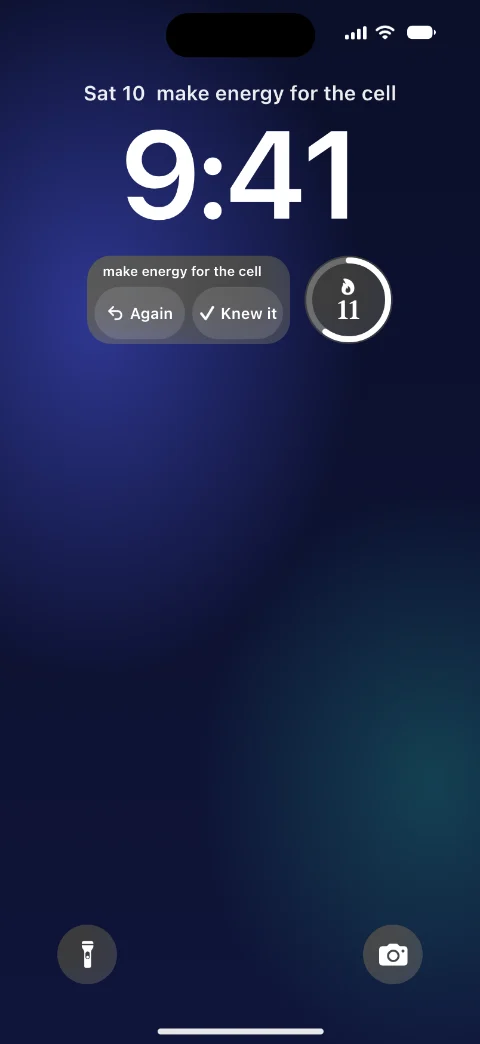
Paste any list or text. One card waits on your Lock Screen each time you pick up your phone, paced to your test date.

For a citizenship test, a new language, or an exam.

Free, no account, no ads. For iPhone and iPad with iOS 26 or later.

Why it works

Terminus is built on two study methods with strong evidence.

  • How useful each study method is
    High
    Practice testingIn TerminusSpaced practiceIn Terminus
    Moderate
    Explaining whySelf-explanationMixing topics
    Low
    SummarizingHighlightingKeyword mnemonicsPicturing the textRereading

    Testing yourself beats rereading.

    A review of 10 study methods rated practice testing and spaced practice the most useful, and rereading among the least. Terminus asks the question first, so you recall the answer before you check it.

    Dunlosky and others, 2013

  • One card, answered “Good” each time, with a test in 33 days

    Spaced reviews beat cramming.

    In a study of more than 1,350 people, a longer gap before the review, up to a point, kept facts for longer. Terminus brings each card back just before you would forget it, and fits its reviews into the days before your test.

    Cepeda and others, 2008

Sources
  1. Dunlosky and others, 2013: Improving students’ learning with effective learning techniques
  2. Cepeda and others, 2008: Spacing effects in learning

The sources were read on October 11 and 12, 2026.

Learn your own cards with Terminus

From any list or text to a card on your Lock Screen, ready by your test date.

  • Terminus’s Paste a list screen with a paragraph about the cell pasted in, the line This is text, not a list, and the button Find cards in this text.

    Paste any text.

    Paste a list, a Quizlet export or your own notes. In a text, Terminus finds the terms it explains.

    Paste a Quizlet export

  • The same widget after a tap: the answer, make energy for the cell, over the buttons Again, Hard, Good and Easy, each with when the card comes back.

    Answer on your Lock Screen.

    One card waits each time you pick up your phone, and it does not interrupt you. Tap to check, then pick Again, Hard, Good or Easy.

    The Lock Screen widget

  • Terminus’s Sets screen: Biology 101 on the Lock Screen, 85% ready for its test on Thursday, November 12, and three more sets, each with its readiness.

    Be ready by test day.

    Set your test date. Terminus fits every card’s reviews into the days you have left, and shows how ready you are.

No list yet? Ask an AI chat.

Any AI chat can write a list on any topic. You use the chat you already have, and Terminus needs no AI account.

  1. Copy the prompt, and put your topic in it.
  2. Paste it into ChatGPT, Claude, Gemini or any AI chat.
  3. Copy the list it writes, and paste it into Terminus.
Make about 40 flashcards on [topic].
Put them in one code block, one card per line, like this:
term - definition
No numbers, no bullets, no bold, no empty lines.
Use plain ASCII hyphens only.
Keep each definition under 15 words.

Download Terminus

Free, no account, no ads. For iPhone and iPad with iOS 26 or later.

Questions? Answers.

Is it free?
Yes. Terminus is free, with no account, no ads and no in-app purchases. Make as many sets and cards as you want.
How is it different from other flashcard apps?
Your cards wait on your Lock Screen, so you study each time you pick up your phone, with no app to open. And you need no account.
How does it know when to ask a card?
Each card comes back just before you would forget it, from FSRS, an open spaced repetition model. With a test date, Terminus fits every card’s reviews into the days you have left.
What can I paste?
A list with one card per line, a Quizlet export, or any text, such as your notes. In a text, Terminus finds the terms it explains.
Who is it for?
Anyone with a test date or a list to learn, such as a citizenship test, a new language, or an exam.
What do I need?
An iPhone or iPad with iOS 26 or later. The app is in English, and your cards can be in any language.
Where are my cards kept?
On your devices and in your own iCloud, which we cannot read. A copy goes to our server only if you turn on Connect an AI, which lets your AI assistant add cards for you.

Get your cards on your Lock Screen. It’s free.